Swift BAT Data Finders (gdt.missions.swift.bat.finders)
Similar to the observatory-level data finders (e.g. for finding auxiliary data containing the observatory orbital position and pointing), the BAT data are stored relative to an observation ID (ObsID), where a time series of BAT data may be split up over many different ObsIDs, and hence different directories, without a direct and simple way to extract the data in its original time-sequenced form. This package provides two different ways to search for data: a search based on the ObsID, and a search that finds data that covers a time range of interest.
Finding BAT Data with a Time and an ObsID
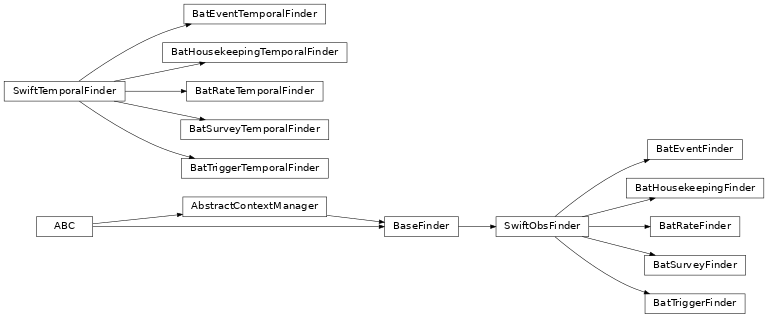
The simplest way to find BAT data is if you know the ObsID and the time of the observation. There are five different data finders that are responsible for the different types of BAT data:
Class |
Description |
|---|---|
Finds BAT event data |
|
Finds BAT housekeeping data |
|
Finds BAT continuous rate data |
|
Finds BAT survey data |
|
Finds BAT data products from on-board triggers |
As an example, we know that we want the rate data for ObsID 00974827000 that covers a specific time on May 28, 2020:
>>> from gdt.missions.swift.time import *
>>> from gdt.missions.swift.bat.finders import BatRateFinder
>>> t0 = Time('2020-05-28 10:28:00')
>>> obsid = '00974827000'
>>> finder = BatRateFinder(t0, obsid)
>>> print(finder)
<BatRateFinder: 2020-05-28 10:28:00.000, 00974827000>
We can display the remote archive directory:
>>> finder.cwd
'/swift/data/obs/2020_05/00974827000/bat/rate'
And we can list the files in the directory:
>>> finder.files
['sw00974827000brt1s.lc.gz',
 'sw00974827000brtmc.lc.gz',
 'sw00974827000brtms.lc.gz',
 'sw00974827000brtqd.lc.gz']
Finally, we can download the full file list or a subset:
>>> # download full file list
>>> download_paths = finder.get('download_dir', finder.files)
Finding BAT Data with Only a Time
This package enables searching for Swift BAT data using only a time or time range without requiring knowledge of the ObsID. For a more complete description of this process and the resulting pitfalls, see the documentation about the observatory-level data finders. The important thing to note here is that the following finders will search over multiple ObsIDs to find the requested data, however, the data files it finds encompasses the data requested, hence some of the files may not contain relevant data. The only way to determine which of the files contain the data you want is to read them. This is a consequence of how the archive and data files are organized.
There are five temporal data finders corresponding to the finders listed in the previous section:
Class |
Description |
|---|---|
Finds BAT event data |
|
Finds BAT housekeeping data |
|
Finds BAT continuous rate data |
|
Finds BAT survey data |
|
Finds BAT data products from on-board triggers |
Let’s demonstrate how these finders work, by searching for BAT rate data covering a one-hour period on May 28, 2020:
>>> from gdt.missions.swift.bat.finders import BatRateTemporalFinder
>>> t0 = Time('2020-05-28T10:28:00')
>>> t1 = Time('2020-05-28T11:28:00')
>>> finder = BatRateTemporalFinder(t0, tstop=t1)
>>> print(finder)
<BatRateTemporalFinder: 2020-05-28 10:28:00.000, 2020-05-28 11:28:00.000>
Displaying the remote archive directories:
>>> finder.cwd
['/swift/data/obs/2020_05/00013483015/bat/rate',
 '/swift/data/obs/2020_05/03106436001/bat/rate',
 '/swift/data/obs/2020_05/00095119034/bat/rate',
 '/swift/data/obs/2020_05/00974827000/bat/rate']
Notice that now instead of a single directory, there are four different directories containing the files spanning this time range. We see how many total files there are in these directories:
>>> finder.num_files
16
There are 16 files across 4 directories. As with the previous example, you can list all the files and download them all, but these finders also provide helper functions that group specific files together. For example, we can list and download all of the millisecond-scale rate lightcurve data:
>>> finder.ls_millisecond_lc()
['sw00013483015brtms.lc.gz',
 'sw03106436001brtms.lc.gz',
 'sw00095119034brtms.lc.gz',
 'sw00974827000brtms.lc.gz']
>>> finder.get_millisecond_lc('download_dir')
We can similarly do this for the maximum count rate lightcurve data:
>>> finder.ls_maxrate_lc()
['sw00013483015brtmc.lc.gz',
 'sw03106436001brtmc.lc.gz',
 'sw00095119034brtmc.lc.gz',
 'sw00974827000brtmc.lc.gz']
>>> finder.get_maxrate_lc('download_dir')
Each of the temporal data finders provide a variety of helper functions to group data types together for download, so checkout the documentation for the respective classes.
BAT Data Products Descriptions:
More information can be found in the Swift Archive Documentation.
Event Data
File Name |
Description |
|---|---|
sw[obs_id]bevshsp_uf.evt |
Standard event data during both slew and pointing |
sw[obs_id]bevshsl_uf.evt |
Standard event data during slew only |
sw[obs_id]bevshpo_uf.evt |
Standard event data during pointing only |
sw[obs_id]bevrt_uf.evt |
Derived information from ray tracing used to construct a response |
Housekeeping Data
File Name |
Description |
|---|---|
sw[obs_id]bhd.hk |
Housekeeping header data |
sw[obs_id]ben.hk |
Engineering housekeeping parameters |
sw[obs_id]bdp.hk |
Detector panel housekeeping parameters |
sw[obs_id]bevtssp.hk |
Contains the timestamps of event data |
sw[obs_id]bevtlsp.hk |
Contains additional telemetry relevant to event data |
sw[obs_id]bgocb.hk |
The gain and offset calibration values for each detector |
sw[obs_id]bdecb.hk |
Contains the detectors that are enabled during the observation |
sw[obs_id]bdqcb.hk |
Contains the detector quality flags |
Rate Data
File Name |
Description |
|---|---|
sw[obs_id]brt1s.lc |
1-second lightcurve data in four energy channels |
sw[obs_id]brtms.lc |
64-ms lightcurve data in four energy channels |
sw[obs_id]brtqd.lc |
1.6-second lightcurve data in four energy channels separated into quadrants |
sw[obs_id]brtmc.lc |
Maximum count rate per quadrant on different timescales in four energy channels |
Survey Data
File Name |
Description |
|---|---|
sw[obs_id]bsv[ab|pb]o[offset]g[gain].dph, |
Detector plane histograms compiled either after a burst (ab) or pre-burst (pb). |
Trigger Data
File Name |
Description |
|---|---|
sw[obs-id]bev1s.lcv |
BAT Light curve with 1-second bins and 4 energy bands(includes data taken during slew) |
sw[obs-id]bevms.lc |
BAT Light curve with 64-msec bins and 4 energy bands |
sw[obs-id]bevbu.gti |
Burst time intervals(T50, T90, T100, Tpeak, and background intervals) |
sw[obs-id]bevpb_dt.img |
BAT Detector image for pre-burst interval |
sw[obs-id]bevpb_sk.img |
BAT Sky image for pre-burst interval |
sw[obs-id]bevps_dt.img |
BAT Detector image for pre-slew burst interval |
sw[obs-id]bevps_sk.img |
BAT Skyimage for pre-slew burst interval |
sw[obs-id]bevps.pha |
BAT Spectrum for pre-slew burst interval |
sw[obs-id]bevps.rsp |
BAT Response matrix for pre-slew spectrum |
sw[obs-id]bevsl.pha |
BAT Spectrum for slew burst interval |
sw[obs-id]bevas_dt.img |
BAT Detector image for post-slew burst interval |
sw[obs-id]bevas_sk.img |
BAT Sky image for post-slew burst interval |
sw[obs-id]bevas.pha |
BAT Spectrum for post-slew burst interval |
sw[obs-id]bevas.rsp |
BAT Response matrix for post-slew spectrum |
Reference/API
gdt.missions.swift.bat.finders Module
Classes
|
This class finds Swift BAT event data based on date and observation ID. |
|
Find Swift BAT event data that covers a given time or time range. |
|
This class finds Swift BAT housekeeping data based on date and observation ID. |
|
Find Swift BAT housekeeping data that covers a given time or time range. |
|
This class finds Swift BAT rate data based on date and observation ID. |
|
Find Swift BAT rate data that covers a given time or time range. |
|
This class finds Swift BAT survey data based on date and observation ID. |
|
Find Swift BAT survey data that covers a given time or time range. |
|
This class finds Swift BAT triggered data based on date and observation ID. |
|
Find Swift BAT triggered data that covers a given time or time range. |
Class Inheritance Diagram